CMHA’s newly updated SRWall 5 Design Software is the only resource for one-stop design of segmental retaining walls. Wall designers, geotechnical engineers, civil engineers, and others who design SRWs will benefit the most from CMHA’s SRWall 5 software. The latest release is technically robust with the addition of updated features like easy-to-follow results, new utilization ratios, a more intuitive display, multi-section projects, and includes a copy of CMHA’s Design Manual for Segmental Retaining Walls (3rd Edition) in the software.
Key Features
Updated Navigation: Seamless compatibility with the latest operating systems for a smooth user experience.
Robust Structural Designs: Utilize SRWs confidently, adhering to the CMHA Design Manual for Segmental Retaining Walls (3rd Edition).
Technical Excellence: Enjoy features like offset surcharges, rectangular distributed loads, variable deflection capabilities, and Internal Compound Stability (ICS) analysis.
User-Friendly Results: Clear and easy-to-follow results, including a new utilization ratio and multi-wall project format.
Intuitive Display: A more intuitive display that simplifies complex design processes.
Design ManualIncluded: The software comes with a copy of the SRW Design Manual for Segmental Retaining Walls.
Automatic Updates: Stay updated with the latest releases and features when connected to the internet.
SRWall 5 serves professionals who demand accuracy, reliability, and ease of use in their SRW projects. Its technical robustness and user-friendly interface ensure that you remain on the leading edge of SRW design technology, providing the tools you need to achieve excellence in every project.
Purchase Information
CMHA offers yearly subscriptions for $325/year. Bulk pricing is $275/year for 10 copies or more. Ready to purchase SRWall 5 Design Software? Contact our CMHA Publications Department.
Phone: (703) 713-1900 | Monday – Friday from 9 am – 5 pm EST only.
The Masonry Assembly Thermal Simulation Software quickly and easily determines both steady-state and dynamic thermal properties for masonry assemblies.
Access the software by downloading the ZIP file using the link to the right and extracting the files on your computer. The password when the installer asks is brickresearch
Determining the thermal properties of masonry assemblies can be challenging, especially for those systems that have unique unit configurations. A new software package has been developed for the masonry industry to make these types of analyses easier and more accurate. The software will determine steady-state thermal properties (such as R-value and U-factor) and also perform dynamic analysis using simulated climate conditions (for evaluating the impacts of thermal mass on performance). The software has an easy-to-use interface and provides accurate, defensible, and realistic thermal properties. Developed through an NCMA Foundation grant by researchers at Clemson University, this new tool will be valuable for the industry.
Direct Design Software is something completely different. It enables design of an entire masonry structure in minutes, with just a few simple inputs. Simply enter a few input criteria, specify the plan layout and opening locations, and the software does the rest.
Check out what Direct Design can do!
Looking for a deeper dive? Take a look at this recorded webinar.
NEW FOR VERSION 3.1 – IMPORT/EXPORT FEATURE WITH AUTODESK REVIT
The latest version of the Direct Design Software enables you to import building models from Autodesk Revit and export structural schedules back. Save time and money by not having to duplicate models. The Revit plugin has recently been updated to be compatible with Revit 2021. Learn more and download the Revit plugin here.
This software is based on the The Masonry Society’s (TMS) Direct Design Handbook (TMS 403) has revolutionized a masonry project workflow when it comes to saving precious time and ultimately going above and beyond one’s client’s expectations.
It also allows one to easily communicate the design to your draftsman or contractor with fully-detailed wall elevation drawings that are not only up to the latest consensus standards and building codes, but provide a direct, simplified procedure for the structural design of concrete masonry structures for reinforced masonry.
The software fully unlocks the power of the Direct Design approach because it’s fully automated, as is the detailing of every block and reinforcing bar.
Additionally, it helps to mitigate confusion through transparency by displaying the full text of every calculation and decision made by the program. The user can verify every step as necessary to ensure full peace of mind.
Please enter your contact information below to download the trial software.
"*" indicates required fields
Join CMHA Today
The benefits privileged to members? Bountiful. Attend industry-defining events and network and get a place at the table at meetings, tradeshows, conventions and more. Get access to CMHA’s vast libraries that host technical and promotional information as well as to the laboratory where products, materials and techniques are optimized.
The Masonry Assembly Thermal Simulation Software quickly and easily determines both steady-state and dynamic thermal properties for masonry assemblies.
Access the software by downloading the ZIP file using the link to the right and extracting the files on your computer. The password when the installer asks is brickresearch
Determining the thermal properties of masonry assemblies can be challenging, especially for those systems that have unique unit configurations. A new software package has been developed for the masonry industry to make these types of analyses easier and more accurate. The software will determine steady-state thermal properties (such as R-value and U-factor) and also perform dynamic analysis using simulated climate conditions (for evaluating the impacts of thermal mass on performance). The software has an easy-to-use interface and provides accurate, defensible, and realistic thermal properties. Developed through an NCMA Foundation grant by researchers at Clemson University, this new tool will be valuable for the industry.
Software for Hydrologic & Structural Design of Permeable Interlocking Concrete Pavements.
Design permeable interlocking concrete pavement for pedestrian areas, parking lots, alleys and streets, the most durable and repairable permeable pavement surface. American or metric versions include an extensive documentation and help library, as well as on-screen, mouse-over advice. Software includes input error-trapping for learners. Purchase license and download the program from www.permeabledesignpro.com. Program automatically updates via the Internet. Design professionals with projects may obtain the program from CMHA members and ICPI Foundation supporters. Contact CMHA for details.
Inputs: Site configuration, contributing drainage area and surface(s), slope, curve numbers and roughness; library of SCS-type rainfall events (2, 5, 10, 25, 50, 100-year) for US or from Environment Canada for Canadian projects; optional user-provided rainfall events; traffic loads (ESALs) for parking lots or streets; soil strength (MR, CBR or R-value) and infiltration rate; base/subbase aggregate gradations; underdrain(s) diameter, slope and spacing; and antecedent rainfall depths within the subbase.
Outputs: Base/subbase porosity and thicknesses based on storage hydrograph flows; storage and outflow volumes; curve numbers and runoff coefficients; structural subbase thickness up to 1 million ESALs; CAD output cross section of design solutions with/without underdrains, exportable to project drawings. Print or save input/output reports as a pdfs and numeric hydrographs as Excel files.
Uses non-proprietary FHWA Drainage Requirements in Pavements software for hydrologic analysis (water balance); structural design based on AASHTO 1993 Guide for Design of Pavement Structures soon to be updated to UC Davis/Caltrans design tables based on full-scale load testing and mechanistic analysis as reported here and as in the ASCE/ANSI T&DI Standard Guide for Permeable Interlocking Concrete Pavements covering design, construction and maintenance.
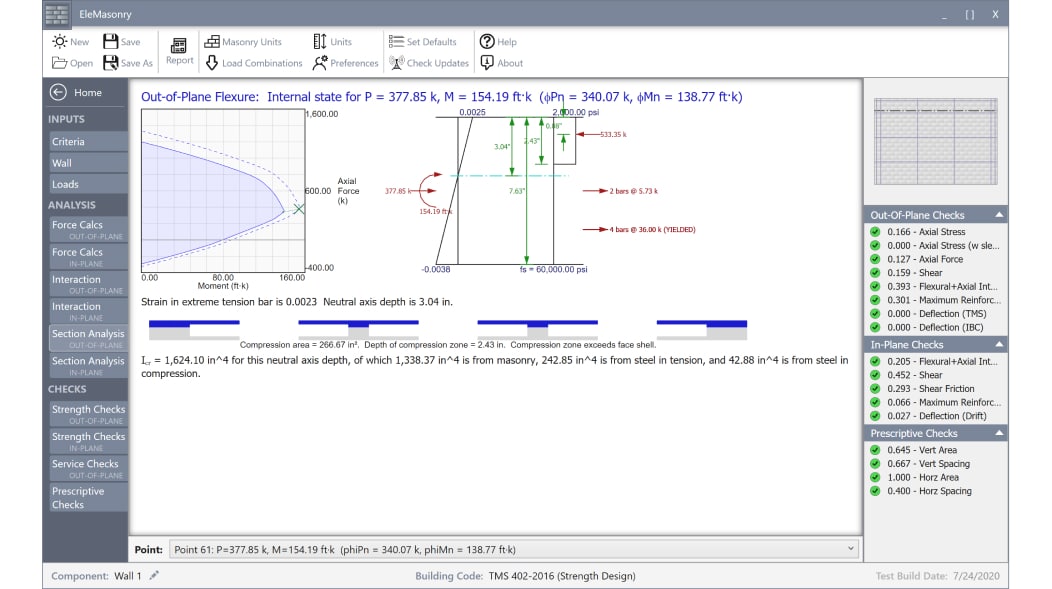
CMHA’s EleMasonry Design Software is an innovative masonry design software package that quickly and easily designs a variety of masonry building elements.
The software quickly and easily designs walls, columns, beams and pilasters. Code-compliant designs are provided through a fully transparent design process and output, allowing the user to review and check all design calculations.
The software designs using all current codes and standards, including the 2016 TMS 402, Building Code Requirements for Masonry Structures, which is referenced in both the 2018 and 2021 International Building Code. Both Strength Design and Allowable Stress Design methodologies are supported.
Also included is a unique solver that accommodates accurate and flexible handling for various wall configurations such as bars both centered and at faces, bars spaced further than the flexural compression limit (6t), and concentrated bars at wall ends.
This innovative approach yields better design efficiency and handles a wider variety of wall configurations when compared to conventional design methods.
If you are interested in this software, download our 30-day free trial using the links on the right.
Check out screen shots from the software below:
Price: $260 for annual individual license. To purchase, please call CMHA at (703) 713-1900.
Direct Design Software is something completely different. It enables design of an entire masonry structure in minutes, with just a few simple inputs. Simply enter a few input criteria, specify the plan layout and opening locations, and the software does the rest.
Check out what Direct Design can do!
Looking for a deeper dive? Take a look at this recorded webinar.
NEW FOR VERSION 3.1 – IMPORT/EXPORT FEATURE WITH AUTODESK REVIT
The latest version of the Direct Design Software enables you to import building models from Autodesk Revit and export structural schedules back. Save time and money by not having to duplicate models. The Revit plugin has recently been updated to be compatible with Revit 2021. Learn more and download the Revit plugin here.
This software is based on the The Masonry Society’s (TMS) Direct Design Handbook (TMS 403) has revolutionized a masonry project workflow when it comes to saving precious time and ultimately going above and beyond one’s client’s expectations.
It also allows one to easily communicate the design to your draftsman or contractor with fully-detailed wall elevation drawings that are not only up to the latest consensus standards and building codes, but provide a direct, simplified procedure for the structural design of concrete masonry structures for reinforced masonry.
The software fully unlocks the power of the Direct Design approach because it’s fully automated, as is the detailing of every block and reinforcing bar.
Additionally, it helps to mitigate confusion through transparency by displaying the full text of every calculation and decision made by the program. The user can verify every step as necessary to ensure full peace of mind.